Ingress Authentication
This page documents the usage and integration of the Ingress Auth feature of the SSO Bridge. It works with the Kubernetes NGINX Ingress Controller and, for deployments migrating to the Gateway API, with Envoy Gateway.
Overview
The SSO Bridge provides endpoints to enable OAuth2-based authentication for applications protected by a proxy, so individual applications do not have to implement the login flow themselves. The proxy asks the SSO Bridge whether a request is authenticated; the SSO Bridge answers, and redirects the user through the OAuth2 login flow when it is not.
Two wirings are supported, and both can be active at the same time while migrating:
| Proxy | Mechanism | Endpoints used |
|---|---|---|
| NGINX Ingress Controller | auth-url + auth-signin annotations | /api/ingress-auth/auth-url, /api/ingress-auth/auth-signin |
| Envoy Gateway | SecurityPolicy with extAuth.http | /api/ingress-auth/ext-authz/<clientId> |
Both share the same session, client registration and callback, so a user who logs in through one is logged in for the
other. Sessions are cookie-based, which is why the proxy must forward the Cookie header to the SSO Bridge.
The Envoy Gateway wiring is newer and has not yet been validated against a production deployment. The NGINX Ingress Controller remains the supported default. See Envoy Gateway below for what to verify.
App creation in SSO Bridge
Login to the SSO Bridge and navigate to the Clients tab as displayed below.
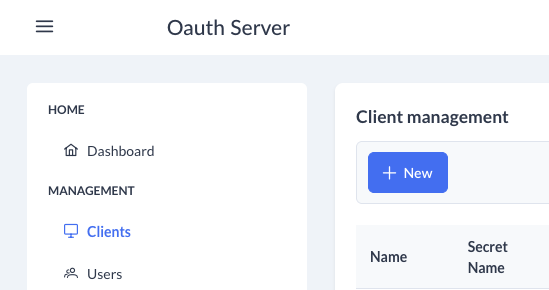
Create a new client for your application with the following attributes:
- Name (Name of your application)
- Secret Name (Name of the Kubernetes secret that holds the credentials)
- Description (Description to clarify the exact application)
- Client ID
- Client Secret
- Roles (If you require any roles)
- Grants These should be set to
client_credentials.
NGINX Ingress Controller
Required Ingress Annotations
Add the following annotations to your ingress resource:
nginx.ingress.kubernetes.io/auth-url: "https://<your-sso-bridge>/api/ingress-auth/auth-url"
nginx.ingress.kubernetes.io/auth-signin: "https://<your-sso-bridge>/api/ingress-auth/auth-signin?clientId=<your-client-id>&rd=$request_uri"
auth-url: Called by ingress to check authentication status.auth-signin: Where unauthenticated users are redirected to start the login flow. Fill in theClient IDof the SSO Bridge application that you just created in the<your-client-id>placeholder.
Example Ingress Resource
apiVersion: networking.k8s.io/v1
kind: Ingress
metadata:
  name: my-app
  annotations:
    nginx.ingress.kubernetes.io/auth-url: "https://example.com/api/ingress-auth/auth-url"
    nginx.ingress.kubernetes.io/auth-signin: "https://example.com/api/ingress-auth/auth-signin?clientId=my-example-client-id&rd=$request_uri"
spec:
  rules:
    - host: my-app.example.com
      http:
        paths:
          - path: /
            pathType: Prefix
            backend:
              service:
                name: my-app-service
                port:
                  number: 80
Envoy Gateway
The Gateway API has no equivalent of the NGINX auth annotations, so external authentication is configured through an
Envoy Gateway extension: a SecurityPolicy attached to the application's HTTPRoute. Envoy calls the SSO Bridge once
per request rather than twice, so the check and the sign-in redirect are served by a single endpoint,
/api/ingress-auth/ext-authz.
Envoy prefixes the check request with the configured path and appends the original request path, so the client ID is
carried as the last segment of path:
apiVersion: gateway.envoyproxy.io/v1alpha1
kind: SecurityPolicy
metadata:
  name: my-app-ext-auth
spec:
  targetRefs:
    - group: gateway.networking.k8s.io
      kind: HTTPRoute
      name: my-app-route
  extAuth:
    failOpen: false
    http:
      backendRefs:
        - name: my-tsg-sso-bridge
          port: 3000
      path: "/api/ingress-auth/ext-authz/my-example-client-id"
      headersToExtAuth:
        - cookie
        - host
        - x-forwarded-proto
        - x-forwarded-host
        - x-forwarded-uri
        - authorization
      headersToBackend:
        - x-tsg-user-id
        - x-tsg-username
        - x-tsg-permissions
        - set-cookie
The TSG application charts do not render this for you — TSG's own applications are not intended to sit behind this flow. Wire it up by hand as shown above for your own deployment.
When the request is authenticated the endpoint answers 200 and describes the user to the application through
x-tsg-user-id, x-tsg-username and x-tsg-permissions. These are only trustworthy if the application is reachable
solely through the gateway; an application exposed directly must not trust them.
If the SSO Bridge is served under a sub path, prefix path with it (for example /sso-bridge/api/ingress-auth/...).
A backendRefs entry in another namespace additionally requires a ReferenceGrant in the SSO Bridge's namespace.
Supplying the client ID out of band
Proxies that cannot vary the path per route may send the client ID as an x-tsg-client-id header or a clientId query
parameter instead. When either is present the entire trailing path is treated as the original request path.
What to verify before relying on this
The Envoy Gateway wiring has not been validated end to end yet. Two behaviours decide whether the login flow works:
- The redirect must reach the browser. On a deny, Envoy returns the auth service's response to the client. The
302and itsLocationheader only arrive if Envoy is not filtering them out, which is governed by Envoy'sallowed_client_headers_on_denied_response. If the browser receives a bare403instead of following the redirect, this is why. Set-Cookiemust survive the callback. The session cookie is set on the SSO Bridge's own domain during the callback, which is routed normally rather than through the policy, so this generally works — but confirm the cookie is present on the return leg.
How It Works
- User requests a protected resource via the proxy.
- The proxy asks the SSO Bridge whether the request is authenticated.
- NGINX calls
/ingress-auth/auth-url; if authenticated the request proceeds, otherwise NGINX returns a 401 and redirects the user to/ingress-auth/auth-signin. - Envoy calls
/ingress-auth/ext-authz/<clientId>; if authenticated the request proceeds with the identity headers added, otherwise the endpoint answers with the redirect directly.
- NGINX calls
- The login flow starts, redirecting the user to the authorization server.
- After login, the OAuth2 provider redirects to
/ingress-auth/callback. /ingress-auth/callbackexchanges the code for tokens, establishes a session, and redirects the user to their original destination.
Sequence Diagram
Notes & Best Practices
-
The SSO Bridge must be accessible to the proxy and users.
-
You can only use the Ingress Authentication for the SSO Bridge's own host and its subdomains. For example if you host your SSO Bridge on
sso.example.com, applications hosted on*.sso.example.comcan be used for ingress authentication automatically. This is enforced: a redirect to any other host is rejected withInvalid redirect target, so that the login endpoint cannot be abused as an open redirect. Sibling domains such asexample.comorapp.example.com, and any other host, must be listed explicitly:ingressAuth:allowedRedirectDomains:- partner.other-example.com -
OPTIONAL If you want to use logout, you have to implement the
ingress-auth/logoutendpoint in your own application. This will remove the user object on the session.
Troubleshooting
- If authentication works in a browser but not via the proxy, check that the
Set-Cookieheader is present and not stripped in transit. - Use browser dev tools to verify cookies are set and sent on subsequent requests.
Invalid redirect targetmeans the application's host is not on the SSO Bridge domain; add it toingressAuth.allowedRedirectDomains.No client ID providedon the Envoy Gateway path means theSecurityPolicypathdoes not end with the client ID, and nox-tsg-client-idheader was sent.- Landing back on the wrong URL after login usually means the proxy did not forward a host header. The SSO Bridge logs a warning and falls back to a relative redirect; add
host(orx-forwarded-host) toheadersToExtAuth.
For more details, see the implementation in ingress-auth.controller.ts and ingress-auth.service.ts.